Showing posts with label clean up music. Show all posts

Monday, March 24, 2014

What You Need to Clean Up Your iTunes Music Library

Oh, where there is a computer, there is a iTunes music library. Maybe you think it is not true, but it is. Most of iTunes music library are in a mess. For example, artwork not showing, unknown albums, duplicates music and missing artist names, etc. It is really time-consuming if you sort out this mess iTunes music library one by one, especially if you have lots of music. Luckily you, here we would like to share 4 tips for you to get your iTunes music library organize.

Tip 1: Deleting Duplicates or Old Songs


It is a good habit for you to clean up iTunes duplicates songs and some of old music you won’t listen to any longer. Well, no afraid of delete any songs you don’t need as you can re-download it even if one day you need it. In this way, you can save some space on iPhone, iPad, iPod or other device. In the clean up process, you may find some classics music which you haven’t know you had and you feel like to listening to again. This is really awesome experience.

Tip 2: Add Missing Artwork


It is really boring if many music without artwork in your library. Adding it is easy to do so but gives another dimension to your iTunes music library. First get the album cover from the Google Image search, then drag it onto the homologous missing artwork. It is able to resize no matter for what size. If you have difficult in finding them, have a try artwork tab. You just need to right click on the music, then click “get info”, at last adjust the detail from artwork tab. All in all, it is really worth for you to add artwork.

Tip 3:Fix Song Information


The most tedious bit is to fix some miss song information such as title, album, genre, artist, etc. However, it is incredibly handy if you are searching for something you prefer to listen to. It is a trick for you that just make the same song title if you are no sure of the album. At least it sounds like what you need it to be. This is the same for genre, I think you will never care about if it is wrong. Well, this is because you are the one listen to it often.

Tip 4: Start Buying From iTunes If You Don’t Already
 

It is common that a lot of people still prefer to free download some songs via some illegal source. That sounds nice but there are several problem need to fix. Firstly, it is poor quality and from a dodgy source. Spare yourself cranking the volume up to maximum to here the lyrics and just buy your songs from iTunes, where everything is great quality by default.
Secondly, everything above is already done for you if you buy from iTunes. Download from another source and the song info will probably be wrong, along with either missing artwork or somebody using the artwork to gain exposure for their site. Wouldn’t you rather have a great, high quality, official graphic than a grey music note?

Summary


Do all those things and I promise that your music collection will look great and organize in no time. If you’re lazy and don’t have the time to do this yourself, you have no need to worry about it as there is an alternative available here for you. Tenorshare iTunes Music Cleanup offer a suite of powerful cleanup function to help you automatically clean your iTunes library in just 1 click. I have ever test it and it really worth a try.

Saturday, February 22, 2014

How to Clean Up or Organize your iTunes Music Library Easily?

Q1: Is there a program that will clean iTunes?

“I am just wondering if there is a program that i can download (preferably free) that will assist me in cleaning my iTunes library. I am very meticulous about organization and i can't seem to seem to get everything done that i would like.”

Q2: How can I clean up my iTunes library?

“I'm tired of it looking so messy. I have a lot of repeated songs and tracks that are repeated. How can I clean it up?”

Q3: How to clean my iTunes Library?


“My iTunes Library annoys me so much! I'd like to clean up all the songs that're misspelled and everything like that in just one quick shot! Is there a popular internet file that people can download for free to clean iTunes music files?”

Missing songs artist information, and album artwork? many "unknown artist" and "Track 01"? Lost of duplicated music? To fix all of these problems, Tenorshare Music Cleanup is what you need. It help you clean up iTunes music library easily and quickly, so that get iTunes library organized and optimized. Download and install this tool to operate it step by step.

Step 1. Import Your Music Library

After you open Music Cleanup, you will find "iTunes Music Clean" is the default mode.

Step 2: Scan to Identity Undefined Songs and Find Duplicates

Click "Start Scan" to scan the whole iTunes library to identify all the undefined songs and find duplicates.

Step 3. Fix Music Information

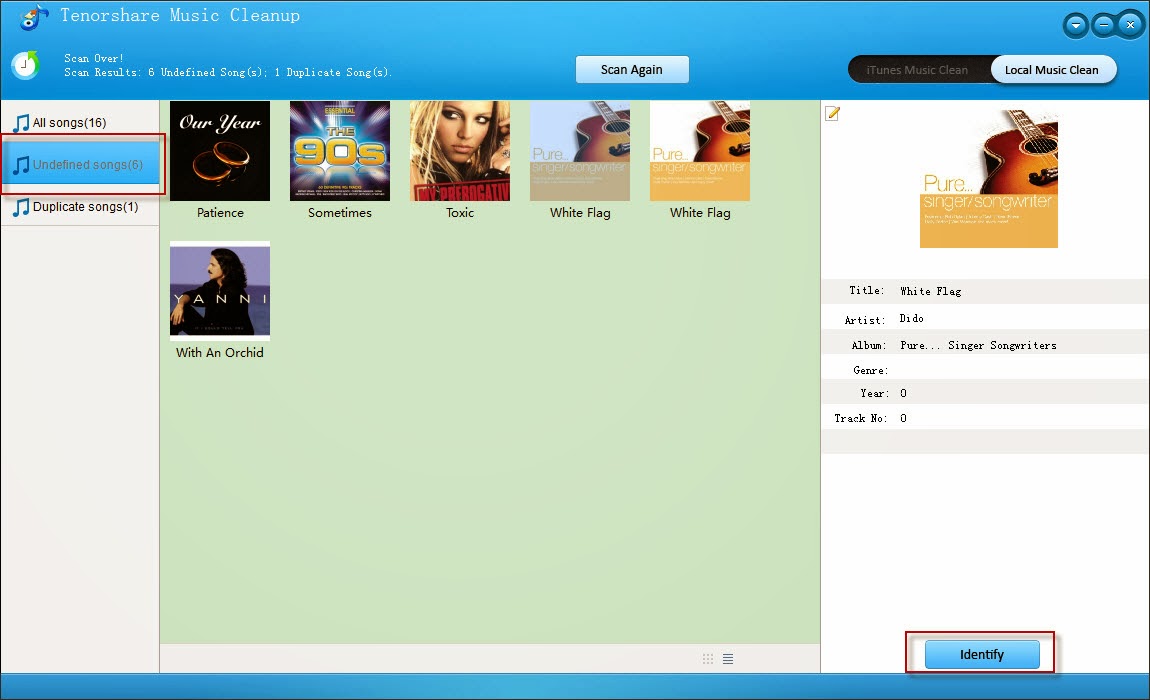
After the scanning is over, Tenorshare Music Cleanup will list the scan result, showing you how many undefined songs and how many song duplicates. Select “Undefined Songs” on the left and you can view all the undefined music in the thumbnail form or in the tabular form. Choose one song and its information will show in the right column.
Click "Identify" in the status bar to allow Music Cleanup to intelligently find all the artist info, album artwork, song name, genre, year, etc. After checking the information, click "Apply". Then all the info will be added to the music files (you are allow to "Identify" information over and over again).

clean up itunes

Step 4. Remove Duplicated Songs

Select "Duplicates" on the left of the interface. You will see all duplicated songs and the number of the copies in the file tray. Choose one song and all files of the same music will show up in the right column. Usually the music file with higher quality will be put a tick and the lower quality a cross. Click "Clear Duplicate" to remove the songs to trash.

That is all. If you found this iTunes clean up guide helpful, please share it with your friends and family. Who knows, maybe they are facing this problem and need help to fix. So please share this article to help them.